Tagging Entries and Pages
Movable Type’s entry and page creation and editing screens makes it easy for you to add, modify or remove tags on individual entries and pages.
When creating or editing an entry or page, click into the Tags field. If the Tags field is not displayed, click on “Display Options” on the right hand side of the page, and check the box marked “Tags.”
Add any tags which you desire in a comma- separated manner (unless you have chosen space-delimited in your author profile). If your tag contains your delimiter of choice, it must be quoted. For example, in a comma-separated list, you would type something like:
bayou, "New Orleans, La.", dixie, cajun foodThe same list with a space-delimited preference would read:
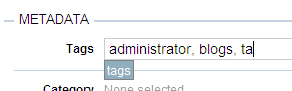
bayou "New Orleans, La." dixie "cajun food"As you type, you will be presented with possible auto-completion choices from the pool of previously used tags on the blog. To select one, simply use the up/down arrow keys to navigate to the right tag and then either hit the Enter key or the Tab key, to select it.
Once you’ve satisfactorily entered or modified the tags for your entry or page, click anywhere outside of the Tags field.
Click the Save button to save the changes you’ve just made to your entry or page.