Deleting a Blog
Warning: Deleting a blog also deletes all of its associated data (e.g. entries, comments, TrackBacks, pages, templates, etc) and, as with all deletions in Movable Type, is final. Please be sure that you no longer need any of this data before proceeding.
Delete a blog in MT5
- Click the logo in the top left corner to get to the User Dashboard.
- Click on “Websites” tab to show the list of websites.
- Click on the link “N blogs” (where N is the number of blogs in the website).
- Select the checkbox of the blog that you wish to delete.
- Click the “Delete” button.
Delete a blog in MT4
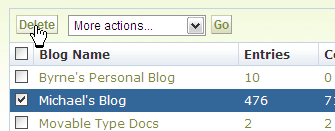
Navigate to the blog listing screen in the System Overview section of by clicking on the “System Overview” link in the upper right-hand corner of Movable Type and selecting “Blogs” from the drop-down menu.
Select the blog(s) you wish to delete and click the “Delete” button above or below the listing. A dialog box will ask you to confirm that you wish to delete the selected blog(s).
Click OK to confirm that you wish to delete the selected blog(s). This will delete the weblog record and all associated entries, categories, tags, comments, TrackBacks and templates from the database and will return a confirmation message.
Note: When you delete a blog in Movable Type, the application does not remove the published blog from the webserver. To fully delete a blog, we recommend removing the published blog files from the server after you delete the blog from the system.


